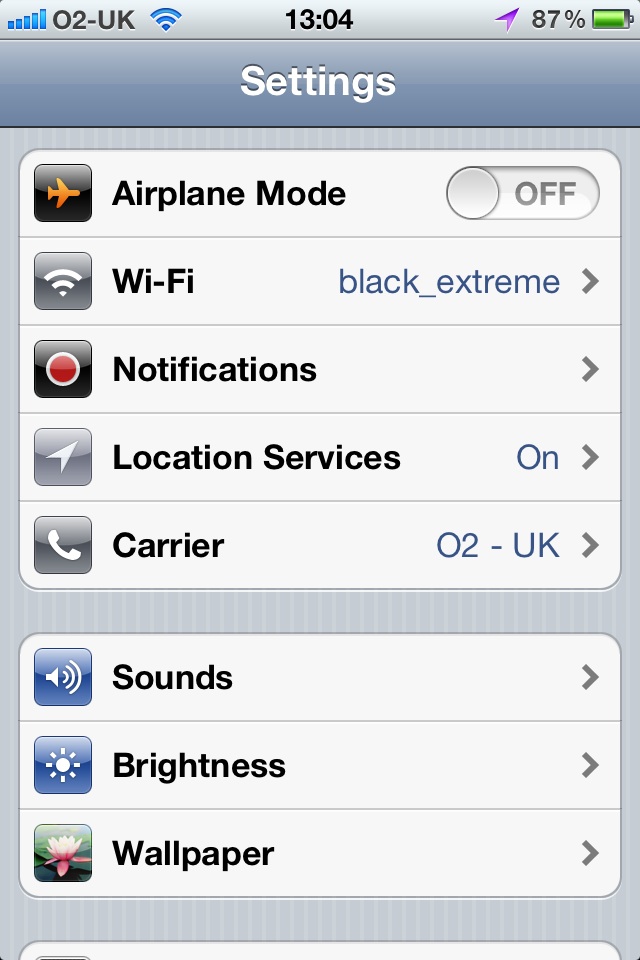
Lost Personal Hotspot Setting with iOS 5 on iPhone

Have you lost your personal hotspot settings on your iPhone after either updating to iOS 5 or getting an iPhone 4s? Well I got it back by resetting the network settings. This worked for me but you do this at your own risk.

What I did was tap on settings then tap on General, scroll down to the bottom and tap on Reset, tap on Reset Network Settings, you will then be prompted for a passcode if you have one (a good idea to have one), enter passcode, tap on Reset Network Settings. Your iPhone should now restart. Be patient as it will restart and could take a couple of minutes. I also had to wait for a moment before it found the mobile phone network and I had to reenter the password for my wifi, so make sure you have that.

As I said this worked for me and I know it has worked for others but you do this at your own risk.

For more help with computers and gadgets that is easy to understand see my website www.jargonfreehelp.com


Posted in Iphone | Tagged , , , , , | Leave a comment

Backing Up Made Easy

There is no doubt about it if you’re not backing your data up then one day you’re going to regret it, if it hasn’t happened already. I’m not just talking about your computer but also your phones and other mobile devices. Certainly backing up used to be a chore, well certainly more of a chore than it is today. Cloud services are going some way to solving this problem but then you might prefer that your data isn’t saved online. There is also the problem that some data is big, like videos, and saving it online may not be practical regardless of how fast your internet connection is.

A lot is about to change for users of the iPad, iPhone and iPod touch with the introduction of iCloud, however, it’s not here yet, allegedly very soon. But it sounds like contacts, calendar entries, notes, apps (already seen this happening), music and video will all be saved online. This includes photos and videos you take with the device that you will have the option to upload automatically, there are some restrictions there as it will be limited to 1,000 photos or 30 days. More about this when it comes out.

In the meantime for mobile devices of any kind backing up is quite straightforward, you simply install software on your computer and when you connect the device it backs up. In the case of the Apple devices this is done via iTunes. This isn’t difficult as once connected it simply backs up everything. Yet, many people don’t do this. Then they lost their phone or it breaks and they want to know how to get the data back, each time I ask did you back it up. The reply is usually no and they expect by magic it will get restored.

If you haven’t done so do it now, well as soon as you finish reading this (I’ll remind you).

That’s mobile devices out of the way but what about your computer? There are a few different options here and there are different option for Windows and Mac. But there are some that apply to both. These are online backup services and work similarly on both. Some people don’t like the idea of online backups concerned that their data is out there and should be private. My understanding is it is not that simple to get the data and basically secure. However, if you have something like a list of passwords or bank details, well then maybe backing up online is not a good idea. Don’t get me wrong it is not that I think it is unsafe but if you’re concerned then save that data elsewhere. The majority of your data is probably not confidential.

So what do I actually use for my online backing up. Well I use Dropbox (www.dropbox.com) which is strictly speaking not a backing up service but a place to store your files and share them if you want to. You can share individual folders without sharing others. The advantage it is it is a sort of backup and you can retrieve the files from any computer and many devices with an internet connection. Now you get 2 GB free but you can pay for more. You can access the files either from a website or by using an app that creates a folder so it appears as any other folder on your computer, add or change files there and it automatically syncs online, you can then see these folders on other computers you have that also have the app and your details. I’ve also added the service that allows me to retrieve files that I’ve deleted in Dropbox and also to be able to look back at older versions. I like this. Oh yeah, it works on Windows, Apple and Linux. Dropbox also maintain that their system is secure. Question marks about its security may come from people who have poor security on their computers and not Dropbox.

For a genuine backing up service, and again can be logged into from another computer, I use Carbonite (www.carbonite.com), this does scheduled backups at set intervals that you decide. Like any backup system it only backs up the new and changed files. The first time you backup it can take some time. You choose what you want backed up. There is a free trial and if you decide to use it the cost is US$59 per year and the amount you can backup is unlimited and they maintain that it is secure.

So these are my two prefer options when online, although I also use Apple’s MobileMe, but that is changing to iCloud (I’ve been using the beta version of this and looks good), until it does I will leave that out of the equation. But I would like to say that when my phone was stolen earlier this year all my contacts and calendar entries were all backed up on it over the internet. Everything else was retrieved when I got a new phone and in a few steps had restored my data and settings from the backup to the new phone.

What about if you don’t want to use an online service and would prefer to backup to a CD, DVD, flash drive or external hard drive? This is where Windows and Apple differ as they use different software. They do the same thing just different programs. Both Windows 7 and Apple have built in back up solutions.

Now for that small reminder, go and back up your phone or mobile device now. Remember that is easy. Then start on your computer.

Gary

http://www.jargonfreehelp.com

Posted in Computing, iPad, Iphone | Leave a comment

Using an iPad Abroad

When Steve Jobs from Apple, you might have heard of him, first announced the iPad I, along with many others, applauded a new approach to getting connected to the Internet and email without the extortionate costs usually involved with data roaming.

The idea is simple, microsim cards to get 3G on your iPad would be done on a month by month basis, that’s right no contract. At any point you could cancel your subscription for that month and then reactivate it at any time, all from your iPad. In case you are wondering, when you cancel your subscription it keeps working up to the end of the month that you paid up to.

Sounds good. So the next time you go on holiday or business overseas, you cancel your subscription at home, assuming you have one, as you don’t need a subscription just because you have a 3G iPad, then when you arrive in your destination pick up a microsim card for the iPad from a provider who stocks them, say AT&T if you are visiting the USA. However, this was not as easy as it sounds.

My first stumbling block was getting a microsim card, not so difficult in the UK just go to one of the providers like O2, Vodafone, Orange or Three, more on this in a minute as there is an issue in the UK too. I went to five AT&T stores in Orlando and they had no idea what I was talking about. I was happy to pay the $14.99 for the microsim card and then it turns out if I could get one, at least another $14.99 for a data plan, when I asked O2 in the UK they gave me the microsim for nothing, I believe the others in the UK will do the same.

Anyway I had an idea, the microsim card for the iPhone 4 from AT&T is the same size and free, you don’t have to pay the up front $14.99. So I got one, they were only too happy to give it to me and these seem to be readily available at the AT&T stores. Next thing was to get a data plan. I didn’t need much so the lowest priced plan of $14.99 would work for me. To get a data plan on the iPad you sign up on the iPad, all you need is a credit card. Errr, it turns out it has to be a local credit card with an address in the USA. How ridiculous bit turns out it is the same in the UK. Three in the UK allow you to pay in cash, debit or credit card over the counter so no problem there.

So how was I going to get around the credit card problem. Well thankfully there are prepaid credit cards readily available from many retail shops in the USA. I got one from Best Buy, preloaded it with some credit when I bought the card in the shop. Got back to the hotel, registered the card with an address, I used the hotels address. Waited a short while, which I was told to do so that the address filtered through and then used this prepaid credit card to purchase my data plan for the iPad.

I feel out of breath, I did at the time it was a lot of running around. You think this would have been easier, anyway here is the work around and you won’t need to do the running around that I had to do to find out how to get this working.

To see the podcast on this episode click on this link http://www.jargonfreehelp.com/episode.asp?video_id=ipad_abroad

Please let me know of your experiences good or bad.

Don’t forget to visit my website for more podcasts and tutorials, don’t forget Jargon Free Help is more than just technology.

Gary

Posted in Computing, iPad | Tagged , , , , , | Leave a comment

GarageBand on the iPad

I’m no musician, well I occasionally try a few notes on my guitar but I’m complete rubbish at it, but I thought I would try the GarageBand app on the iPad, that’s the iPad 1. Many people seem to think that it will only work on the iPad 2 as the two products were announced at the same launch but it works perfectly well on the first generation model.

Now I started off by saying I’m no musician and put me in front of any traditional instrument and you’d be right, but using GarageBand has allowed me to make music, or maybe sounds that just sound a lot better and to me that sounds like music. Does this make me a musician, does it matter what the tool is to allow you to make music that determines if you are a musician? Musicians spend many hours practising their craft and then along comes a device that changes that. Of course, like with anything, you would still need to practise with GarageBand to become really good, but it appears that immediately you can create something.

The other thing GarageBand will do is open up the doors to possibly picking up an instrument that perhaps one hadn’t considered before. Perhaps some latent music talent will be discovered. As GarageBand has an array of instruments you may find there is a particular instrument that appeals to you without having to go and try all of them possibly at great expense.

There are many things I like about GarageBand for iPad including the built in eight track recorder and the ability to export your masterpiece to iTunes or email it.

The drum kit is great and it appears to be touch sensitive, depending on how hard you hit the drums depends on how loud they are. Somehow this uses the accelerometers built into the iPad even when it is on a flat surface, not sure how they did that, how can an accelerometer work if there is no movement? Anyway it does.

As for keyboards and synthesizers there is a huge range to choose from, you could spend a lots of time just exploring the sounds of each one and making adjustments, my favourite at the moment is the Fifties Sci Fi synth.

Guitars allow you to bend strings and if you need help there is the Smart Guitar which makes playing chords easy. In fact there are a number of Smart instruments in addition to the  guitar are keyboard, drums, bass and a drum machine.

If you really do play the guitar and want to record onto the iPad, and add in more instruments, then there are attachments that allow you to connect your guitar.

As with so many apps the price is very reasonable too, I paid £2.99. At that sort of price it makes you feel like it is worth having a go. Check out the video on the GarageBand page on the Apple website http://www.apple.com/ipad/from-the-app-store/garageband.html

Gary

Posted in iPad | Leave a comment

iPhone 4, Has It Been Worth It

I had been recently thinking about getting an iPhone 4, but was thinking well perhaps I should wait for the iPhone 5 which should hopefully be with us by the middle of this year. However, if you’ve been following my blog you’ll know that my iPhone 3GS was recently stolen and the decision was made for me.

I was thinking that I know the iPhone 4 is faster than the 3GS but I was surprised at how much faster and also at the improvement to the camera as well.

One thing in particular was bothering me and that was the speed of the calendar on the 3GS, I used to get frustrated by how fast it loaded or rather how fast it didn’t load. If that wasn’t bad enough adding or editing events in the calendar was incredibly frustrating. On the iPhone 4 it is so much faster. I’m sure this is not just down to the processor but perhaps how all the hardware and software fits together on the iPhone 4. Perhaps the iOS updates are just not really cut out for the iPhone 3GS.

This was probably the biggest improvement for me as I use the calendar often but I have to say everything has been an improvement.

I guess my plan to get an iPhone 4 for my wife has been confirmed, she uses the 3G and I used it the other day, my goodness it was so sluggish, I guess if you don’t use something fast you wouldn’t really notice but it was a big difference for me.

As many of you know I like taking photos and video, and yes it is a camera in a phone and doesn’t offer me some of the benefits of my DSLR but the photos and video are more than acceptable. The camera also starts faster.

Another thing that I tried was Skype and making a video call with it, I was really impressed. I didn’t have to switch on the computer I could see who was online quickly and make the video call. Often it is a pain to switch on the computer to check. Skype is a great app whether it be on a mobile device or computer. Putting it on a mobile device like the iPhone only makes it more convenient. I guess I will have to give FaceTime a try.

The other thing really noticeable is the iPhone 4, this is something I had noticed before in the shop. I was using a microscope recently in a microsurgery simulation lab and had looked at the screen on the iPhone 3GS so on Thursday I did the same to the iPhone 4 and yes even under a microscope it was blatantly obvious that the pixels were a lot finer. In case you were wondering I was videoing trainee surgeons learning to do microsurgery.

Don’t forget for more technology advise check out my podcast at www.jargonfreehelp.com

Gary

Posted in Iphone | Tagged , , , , , , , , , | Leave a comment

Safety First

OK, I might be into technology and that is what I like blogging about but this week is something different. I always go on about being safe online and backing up your computers and mobile devices, but this week is about being safe out on the street. Unfortunately just over a week ago I was mugged for my phone, the mugger did not get a clean grab on my phone and ended in a scuffle, I have two fractures, one finger on each hand, one is from punching him back, hey you’d have done the same if someone had punched you in the face a few times. I’m ok and have been well looked after and pretty much straight back to work.

However, I’ve learnt a bit of a lesson and I hope it doesn’t happen again, although you can just never tell regardless of how careful you are. My incident happened at a busy time on a High Road.

The advice I have had from the police is clearly to be more careful, perhaps not use my phone so much when I’m out and about, but as they said it will ring when I’m walking down the road just be careful and be aware of what is around you.

One thing that does sadden me is the lack of help from the people on the street, they all just carried on, one man helped me find my glasses but then he too walked off. Help your fellow man, I was clearly hurt and no one seemed to care. I don’t expect people to help in the scuffle they have to be safe too, unless or course it gets nasty and they could have helped. But with a slightly bloody nose it was obvious I needed help. Thankfully a colleague of mine back in the office is a doctor and he helped, he took me to A&E, actually he phoned ahead and whisked me through.

One thing that did help is that I back my phone up and by using Mobile Me for my contacts and Google for my calendar I was able to immediately get to the information that I needed. I could use the calendar on Mobile Me and I could have had my contacts on Google too. By using either of these your data is backed up immediately assuming you have a connection whether it be wireless, 3G or one of the other slower mobile connections. So it’s a phone that has gone and I have replaced it with an iPhone 4 which I have to say is a vast improvement on my iPhone 3GS. I’d preferred to have upgraded when I felt like it and was considering it. I have to look at the positive.

So please be aware of your surroundings and make sure you have your important information backed up. If you can don’t fight back just let them take your phone or whatever it is you are after, I’ve been lucky, my fingers are in splints which is inconvenient but they don’t hurt thankfully.

Take care of yourselves.

Gary

Posted in iPad, Iphone, Technology | Tagged , , , , , , | Leave a comment

My Wish List for IPad 2 and iPhone 5

We all have a list of things we want and features we want on our gadgets are no exception. In the part few weeks, no maybe months, there has been lots of talk about what is rumoured we will get on the new iPad 2 and iPhone 5, if that is indeed what they are going to be called.

There seems to be no doubt that there will be at least one camera built in to the iPad 2 and it will be front facing so you can use it for FaceTime, Skype and other communications apps, also good as a mirror too. The thought of a rear facing one to take photos seems almost pointless as it will probably be too cumbersome for that, bit to appease the masses they may add one.

But what is on your wish list?

I guess a lot of people want to use it for storing files, that doesn’t bother me so much as I use Dropbox which works on both the iPad and iPhone.

I’d like to see better imaging software on both devices, there is some but I figure they can do better. iMovie on the iPad is a big tick for me.

Sync notes with apps like Outlook and Entourage.

Wireless syncing.

Easier transfer of iTunes including iDevice settings to a new computer.

Backing up to Time Capsule.

Faster file transfer.

Built in SD card and USB to get photos and video files from cards and cameras directly yo the device.

I know they will add a whole load of clever things including many things we may not have thought of, however, there is one thing, and it is so simple and some software apps have it but not for the reasons I would like. But a button to take a picture with just like you have on a normal camera, the volume buttons could be used as a zoom control. Common Apple that must be so simple. Pressing a button on a screen is so awkward and means you have to hold the camera with two hands. How often have people drop the phone of missed the shot trying to get a photo of themselves or having to stretch out with one hand.

Let’s see what’s coming in 2011 on Wednesday 2nd March.

But what would you like to see?

Gary

Posted in iPad, Iphone | Tagged , , , , | Leave a comment

Looking Forward to CES 2011

Whenever there are announcements about technology my ears prick up hoping there will be something that will capture people’s imaginations and this week is the start of the International Consumer Electronics Show held in Las Vegas. It is the sort of event where celebrities, that is A list celebrities are called upon to help launch products. Also somewhere around this time of the year Apple drags Steve Jobs out to tell us what they are up to, but they haven’t said anything yet. The year has only just started.

As with all things technology today whenever there are announcements the blogosphere goes into overdrive trying to second guess what new products are going to be released, is it going to be the thinest 3D TV with smelly vision or something completely new.

Well the buzz seems to be about what tablet computers (now usually called tablets, although some people find all this new technology so confusing they need a tablet to get rid of the headache) are going to be released, tablets last year were dominated by the iPad with the Samsung Galaxy Tab getting a bit of recognition. And I agree these have certainly opened the door for people who just find computers daunting or perhaps even inconvenient. My mum in her 70s who has never used a computer enjoys using the iPad.

But with all the talk of who is going to make the next big tablet they have kind of overlooked at what one of their biggest strengths is. Video. They are great for watching video, whether it be stored on the device to watch anywhere or streaming using something like YouTube or the BBC iPlayer. So the biggest spin off this year is most likely to be the wealth of video content out there. This is growing and iTunes seems to be leading the way but companies such as Netflix and LoveFilm are turning to the Internet to deliver movies and TV shows. Both companies do DVDs and Blu-Rays Discs (BD) by post but I reckon that people will look more to the Internet to get their content.

But are discs like DVDs and BDs going to last. Not if you look at how successful iTunes is becoming and how their catalogue of movies and TV shows are going. But their is something else happening, iTunes has something called iTunes Extras, like the extras you get on a DVD and BD disc. They’ve had this for a little while now and because the devices you access these extras from are usually connected to the Internet you will probably see more extras and different types of extras that take advantage of this. I’m sure it will connect directly to a shop so you can buy Buzz Lightyear using your iTunes account.

But there is a little move by Sony that has made me think are discs really on their way out. Sony have recently announced that they are trialling adding different extras if you buy via iTunes that are not available on the DVD and BD versions. Sony who make DVD and BD players are giving you something different, possibly more on the iTunes version. That is really interesting. That sounds to me like along with Apple Sony see the future as being discless and online.

This is going to be a very interesting year not just for the tablet market but for the thing that it does so well…video.

Gary

Watch www.jargonfreehelp.com, more than just technology

Posted in Computing, iPad, Technology | Tagged , , , , , | Leave a comment

Losing Weight

Jargon Free Help is more than just technology. I like to share my experiences and hope that it helps others. For some time I’ve been working hard to try and lose weight through dieting and exercise. But for a long time nothing happened. I had become fitter and my weight was not going up but something wasn’t right.

Let me also explain that I’m a type 2 diabetic so losing weight was really important. But it is not easy. However, I changed my strategy a few months ago and it is working. I’m now a respectable 83 kgs (just over 13 stone), I was 92.5 (about 14.5 stone). What did I do and why mention it in a blog about technology?

Well technology helped me, not because of some new tangled device that zaps fat but because of tools that were available to help.

There are two things to weight loss and both are important dieting and exercise. Technology helped me with both.

Like me you are probably dreading the exercise bit, where do you fit it in and how do you stop yourself getting bored. Most people have trouble getting going and many say it is boring. I had the same thought. I joined a gym and wondered how long it would last. Stopping the boredom can be done in a number of ways and believe me makes it more enjoyable. One you could go with a friend who wants to do the same or is already a member. The other is to take an iPod or iPhone, or something similar. Make sure you have your favourite music, TV show or movie and listen to or watch them. Be careful, make sure you device won’t fall and break and make sure you are not at risk, that is don’t use a device on something where you need to be alert. I downloaded podcasts that I found interesting. My wife downloads radio shows and listens to them. This will reduce the boredom and give you a chance to catch up on what you enjoy. I have also downloaded educational podcasts so I learn too.

Why not watch Jargon Free Help whilst exercising, I know some people who do. You can get it from iTunes, just search for it on iTunes.

Don’t flash your device around in the changing room if you have to put it away, you never know who is watching.

Another tip with exercising I found was not to exercise if really tired it makes it hard work. Find a time to suit you and do what you can, of you have 10 minutes do that, if more then do more.

As far as dieting is concerned, I used Excel and Number on the iPad to count my calories, this was really useful. Once I started counting the calories the weight started to fall. I created a vlookup on a spreadsheet to look up the calories based on the food I’d eaten. You can see how to use vlookup in the Excel section of my website, www.jargonfreehelp.com

If you are like me and trying to loss weight drop me a line and share it with me, let me know if any of these tips have helped and if you have any tips, technological or not.

This week I’ll know if it has made a difference when I have my diabetes check up. I’ll let you know how it goes.

Gary

Posted in Dieting, Technology, Weight loss | Tagged , , , | Leave a comment

Internet Ready TV

I read somewhere this week that Internet ready TVs outsell 3D TVs by seven times. This might have something to do with Internet ready TVs being cheaper and that many TVs are Internet enabled even if people are not looking for this feature.

Having said that Internet on your TV makes a lot of sense, in my eyes this should have been done years ago and far more useful than connecting your fridge or other household appliances to the Internet.

So when talking about Internet enabled TVs some have Internet browsers and others have access to services available online such as games or video services like YouTube, the BBC iPlayer and many others. For me it is the services I’m interested in as using a browser with a remote control is probably a little tiresome, however, it wont be long before we have a variety of keyboards to make it easier.

The one thing I was particularly interested in was the BBC iPlayer as I like sitting back and watching programmes and sitting in front of the computer is not as comfortable and there are distractions like email. So I connected the TV to the router, I used a cable but apparently this can be done with a wireless adaptor. I decided to check it out, I did a search and decided to watch Click. Now to give you and idea of how good it looks, my wife, brother and sister in law came into the room not realising how I was watching Click, they all thought it was coming through the Sky box. They were seriously impressed when I then told them it was coming through the Internet.

I then checked out YouTube, naturally I had to check out the videos I have added to YouTube and they looked better than expected. As you might expect from other sources on YouTube some were good and some weren’t but this is normal for YouTube.

There are many others like blip and DailyMotion as well as services like LoveFilm, yes the people in the UK who do DVD rentals through the post. They are offering movies and TV shows as part of a rental package but as well as having access to DVDs through the post you can also watch many movies and TV shows online.

Some of these like the BBC iPlayer and LoveFilm are available in the UK, depending on where you are will determine what is available to you. Check out what you could be getting and as time goes on more will get added.

If you have a TV that you have bought recently then perhaps you have these features available to you but just weren’t aware that they were there.

If you want to see an Internet enabled TV in action then watch this weeks podcast at www.jargonfreehelp.com

Gary

Posted in Technology, TV | Tagged , , , , | Leave a comment