Tips for Saving Battery Life on Your Smartphone

How often have you run out of battery power on your smartphone when you need it most. I guess for many it is on the way home. Here are some tips on how you can get more battery life out of your smartphone and make it home without the battery going flat. This includes switching off the wifi when you don’t need it and also the GPS.

Posted in Android, iOS7, Iphone, Samsung Galaxy S4, Smartphone | Leave a comment

How to Do Headers and Footers in Excel 2010 and 2013

Headers and footers in Excel 2010 and 2013 are a bit different to how you get to them in say Excel 2003. Here in this video is how you can use them.

Posted in Excel | Tagged , | Leave a comment

How to Get Multiple Lines in an Excel Cell

This is a common request in Excel, how do you have more than one line in a cell? All you need to do it turn word wrap on. In the video below you can see how to do it.

Posted in Excel | Tagged , , , , | 1 Comment

Save Battery Life on iOS 7

If you’ve upgraded to iOS 7 like me you might have noticed how quickly it is draining your battery. This is because of all the clever background things going on. So here are a few things you can switch off to improve battery life. By the way, if I discover more I will update this blog.

Don’t forget you can always plug your device in to charge anytime. The battery does not need to be flat to charge. Li-ion batteries can be charged at anytime without affecting the life of the battery.

Before you read on here is the same information in a short video to show you how to do these tips.

Background Apps

It is great that apps are updated in the background but they are using up your battery life. I switched them off. Go to Settings ->General->Background App Refresh and then switch it off. This is what it looks like on my iPhone when switched off.

iOS 7 background app refresh

Location Services

It turns out that even if you aren’t using location services on some apps like Facebook and Twitter they may still be using battery life. Switch off those you don’t need.

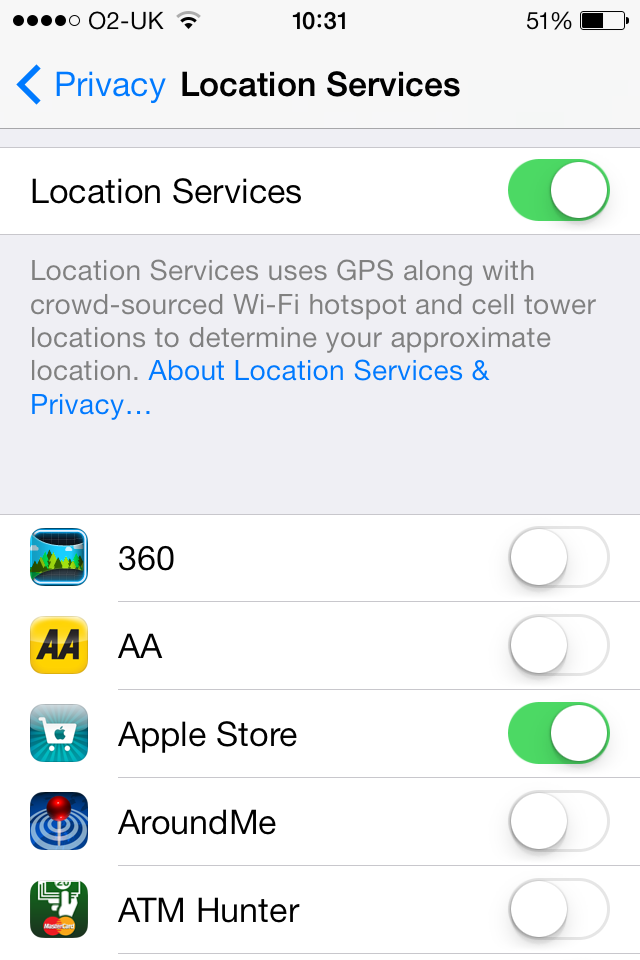
Go to Settings->Privacy->Location Services. In the image below you will see that I have the 360, AA, Around Me and ATM Hunter apps switched off and the Apple Store app switched on.

iOS 7 location services

Moving Wallpaper

Have you noticed that your wallpaper moves when you tilt the iPhone, iPad and iPod touch, very cool but it too uses up battery life. You can stop it doing it by going into Settings->Accessibility->Reduce Motion and switching it on. Yes, you need to switch Reduce Motion on. It looks like this when switched on.

iOS 7 reduce motion

Posted in iOS7, iPad, Iphone | Tagged , , | Leave a comment

Getting Ready for iOS7: Updating Apps and Backing Up

If you are one of those people like me who will want to get their hands on iOS 7 tomorrow (18th September 2013), that is the time in the USA, it is often released in the morning, West Coast time) then it is a good idea to make sure you have backed up your device like your iPhone, iPad or iPod touch and made sure all the apps are up to date.

There is a school of thought you should start from fresh when upgrading to take advantage of the new features, however, I am going to upgrade keeping what I have.

Here is some advice to help you out, remember you do upgrade at your own risk.

For backing up I use the iCloud but if you are not then you need to back up on your computer too. As it happens I do a backup on the computer too, can’t be too careful. This may all be time consuming but if you lose something during the upgrade to iOS 7 then you will be pleased you did. If you are using iCloud make sure you have done a backup, go to Settings -> iCloud, scroll to the bottom and click on Storage & Backup, scroll to the bottom again and click on Back Up Now, usually a good idea to do when you have Wifi unless you have a data package on your mobile account that has plenty of data available, however, I would recommend Wifi. It should automatically backup when charging and with a Wifi connection, in my case it usually backs up overnight, every night.

Many apps have been updated to work on iOS 7 because either they take advantage of new features or do not work well. For this reason it is a good idea to make sure your apps are up to date. Make sure they are by going to the Apps Store, choosing updates and updating your apps, you can do this before you upgrade. This is what I do.

Usually with an upgrade of an iOS comes a new iTunes, if you are prompted to upgrade iTunes then this is probably a good idea.

If you did start from fresh or lost some apps, music, films or TV shows then this video shows you how you can get back what you purchased.

Posted in iOS7, iPad, Iphone, iTunes | Leave a comment

Recording Macros in Excel to Make Tasks Easier

Excel is a great program and it is even better when you get it to do repetitive or complex tasks at a click of a button. You’ve thinking but how is that possible when everyone has different requirements and tasks to do. That is where recording macros comes in handy. You basically get it to remember everything you do and then you can simply play it back when you need it. It creates the script or code for you, this code is called Visual Basic for Applications (VBA).

So there are many things you can do including setting up a spreadsheet, formatting it and then automatically printing it out, or perhaps you want to import some data, reorganise the information, format it, save it and then print it. These are just a couple of examples of where you can use this record macro facility. It is a nice feeling to just click a button and in the blink of an eye Excel has done it for you.

You can do so much more and stay tuned for more tutorials where you can add in interactivity and get Excel to make choices based on criteria that has been entered. Here are two videos to get you started. One is how to record in Excel 2003, the same works for Mac versions of Excel. The other tutorial is how to do it on Excel 2010 but the it works the same way in Excel 2007 and 2013.

Recording Macros in Excel 2003 (and Excel for Mac)


Recording Macros in Excel 2010…and 2007 and 2013

Posted in Excel, Office 2010 | Tagged , , | 1 Comment

How to Get Your Apps, Music, Movies and TV Shows Back on Your iPhone and iPad

Have you bought a new iPhone or iPad, perhaps you have deleted an app, song, movie or TV show you didn’t mean to or just have had to restore the device and need to get this content back. Well thanks to Apple if you have purchase something from their iTunes store or App store you can easily get it back.

Here in this video you can see how.

For videos see my website www.jargonfreehelp.com

Posted in Uncategorized | Leave a comment

Search and Watch Videos on YouTube App

YouTube is amazingly popular and there is so much to watch and some of it is worth watching. So how often have you been watching a video and felt the need to look for another? Well now you can if you get the latest app for iOS (iPad, iPhone, iPod touch) and Android.

Check out this video to see how.

For more see my website www.jargonfreehelp.com

Posted in Android, iOS, iPad, Iphone, YouTube | Tagged , , , , | Leave a comment

Setting Up YouTube Videos to Appear at a Set Time

Until recently it hasn’t been possible to set up a YouTube video to be available at a particular time. As you can imagine this would be useful for me as I could create some tutorials and spread out releasing them rather than doing them all at once or having to manually release them when I want them.

Scheduling a video to appear could also be good for an announcement or some news. It could be useful for student information that you only want them to see when they start a particular subject or project.

Well now you can do this on YouTube you can schedule when you want a video to appear.

Here is a little video tutorial I made, that I actually used the scheduling feature on.

For more tutorials see my website www.jargonfreehelp.com

Posted in video, YouTube | Tagged , | Leave a comment

Reducing the File Size of a Word Document That Has Images / Photographs

Adding images and/or photographs to a Word document can significantly increase the size of the file. In all likelihood the images do not need to be as high quality as you would need if you were printing the image out on its own or if you were sending just the image or photo.

Reducing the size of the file saves hard drive space, better for emailing and in some cases where you have to upload a document such as proposal, quote, assignment, dissertation or thesis this can help too.

In recent versions of Word like 2007, 2010 and 2013 it may well be automatically reducing the file size automatically. Here in this video tutorial I show you how to do it.

If you want to see more Word tutorials check out my website www.jargonfreehelp.com/word-tutorials

Posted in Office 2010, word, word 2010 | Tagged , , , , , | Leave a comment