Using the SUMIFS Function in Excel

I would say one of the first things people learn in Excel is how to total up a column or row of numbers. This is done very simply by using the SUM function. The AutoSum button in most cases does this automatically. But what if you want to total up a range of numbers based on particular criteria. Let’s say you have some sales figures and you want to total them up based on sales made in a particular year such as 2013. Well you could use the SUMIF function. However, what if in addition to the year you wanted to also show only a particular product listed in another row or column. Then you need the SUMIFS function.

In this video you will see how to use the SUMIFS function.

Posted in Excel, Microsoft Office, Office 2010 | Tagged , , , , | Leave a comment

Counting Empty Cells in Excel Using the COUNTBLANK Function

So you might be aware of some useful functions that allow you to count up how many cells have text or a value in it using the COUNT function, you can also count cells based on specific criteria using COUNTIF of COUNTIFS functions. But what if you want to know how many cells are empty because you need to know how much data has not been filled in. For that there is COUNTBLANK.

Here is a video tutorial to show you how to use the COUNTBLANK function.

Posted in Excel, Microsoft Office, Office 2010 | Tagged , , , | Leave a comment

Upgrading to iOS 8

Another software update to Apple’s latest iOS for iPhone, iPad and iPod touch is almost here, 17th September 2014, and although upgrading is usually straightforward it is a really good idea to backup your device first. In fact I highly recommend it.

I backup using iCloud which is invaluable but restoring all the data and apps I have can take a very long time as it has to download it over the internet. I really should consider a clear out even though I’ve just done one. I could download all the photos I’ve taken using image capture, click here to see how to use image capture, or iPhoto and then free up some space for those images I really don’t need to hand.

For these occasions though I do a backup to my computer as I can restore a lot faster from there should something go wrong.

So if you’re planning on upgrading, and there are usually benefits to doing so, make sure you have backed up your iOS device. I have been using the beta version if iOS 8 and have to say there are some features I do like. More about that soon.

Posted in iCloud, iOS, iOS 8, iPad, Iphone, Uncategorized | Tagged , , | Leave a comment

How to Stop Videos Playing Automatically in Facebook on iPhone and iPad

Not so long ago Facebook added a feature where video started playing automatically as you scrolled through your timeline. I found this particularly frustrating and others have said to me that this has eaten away significantly at their mobile data allowance. What annoyed me most was that there wasn’t an option to switch this feature on it just happened. Facebook have also not made it clear how to switch this feature off.

Your options are to play the videos whatever connection you have, and I’m guessing if you are reading this then that is not one of your favoured options. The other two are wifi only and off. This will certainly save your mobile data allowance and also give you control back as to when you want to play the videos.

Here in this video you can see the options on your iPhone and iPad.

Posted in facebook, iPad, Iphone | Tagged , , , , , , | Leave a comment

Showing the Last Saved Date of a Word Document

There are things that are handy in Word that we can get to display automatically in the body text of a document, header and/or footer like the current date, page number, author, file location etc.

This week I was asked how to display the date of when the file was last saved. As it happens there is a field for this called SaveDate. So it doesn’t update to the current date or date when it was opened but just the date when it was saved.

Here is how you can do that in this video.

Posted in Microsoft Office, microsoft word, word, word 2010 | Tagged , , , | Leave a comment

Better Security on Apple’s iCloud Available to You

So some celebrities thought a good place to store photographs of themselves in various states of undress was somewhere online! I guess they could be forgiven for believing that online cloud storage like Apple’s iCloud should offer them security and that other people should not be able to tap into it. So what could they have done about it and it makes sense for us normal people to follow the same rules.

The first thing I would say is don’t store images like this of yourself online. That should be the first rule of not letting delicate information like this getting out there. Same applies to banking details, be careful what you store online.

Secondly make sure you have a really good password, I did a blog a while back about creating a good password, click here to read it.

The other thing is something known as two step authentication which Apple has and you can think of it as a double check to make sure you are who you say you are. Aside from your usual login you will have another code or password that is sent to one of your devices. You only need to do this once. Now some cloud storage systems do this automatically but at the time of writing Apple have it but you need to switch it on. Click here for the link to their support page that shows you how this is done.

Posted in cloud, iCloud, mobile computing, mobile devices, security | Tagged , , , , | Leave a comment

Making Font Bigger on iPhone

As so many of my friends are hitting that age where they need reading glasses it has become apparent that reading the text on their iPhones has become a little tricky or they have to keep putting on their glasses.

Well something that might help is changing the size of the text. It is easy to do. You can either watch the video or follow the instructions below the video.

1. Tap on Settings

2. Tap on General

3. Tap on Text Size

4. Use the slider to increase or decrease the text size.

This does not affect all apps but certainly things like text messages, emails, note and reminders.

Try it out. You may need to open and close an app to see its affect. If you ever need to change back to normal just follow the instructions above and slide back to the middle. IMG_6097.PNG

Posted in iOS, iOS 7, Iphone, Uncategorized | Tagged , , , , | Leave a comment

Open Favourite Documents Quickly in Word, Excel, PowerPoint and Access

We all have documents we use regularly and even though they conveniently appear on our recent file list we can make them even more prominent. This can be done by pinning these files in the recent files list. This is easy to do and you can also do it for popular folder locations too.

Here in this video you will see how easy it is to do. Scroll to below this video to see how you can also use jump lists to get to files even faster.


Using jump lists

Posted in Excel, Microsoft Access, Microsoft Office, microsoft word, Office 2010, PowerPoint, windows 7, word, word 2010 | Tagged , , , , | Leave a comment

Using Do Not Disturb Feature on iPhone and iPad

Before the Do Not Disturb feature came along on my iPhone I had to make sure it was switched to silent before going to sleep. Like so many I keep my iPhone on overnight but if it wasn’t switched to silent there was the risk of a phone call, possibly wrong number, or text message coming through to disturb my well needed beauty sleep.

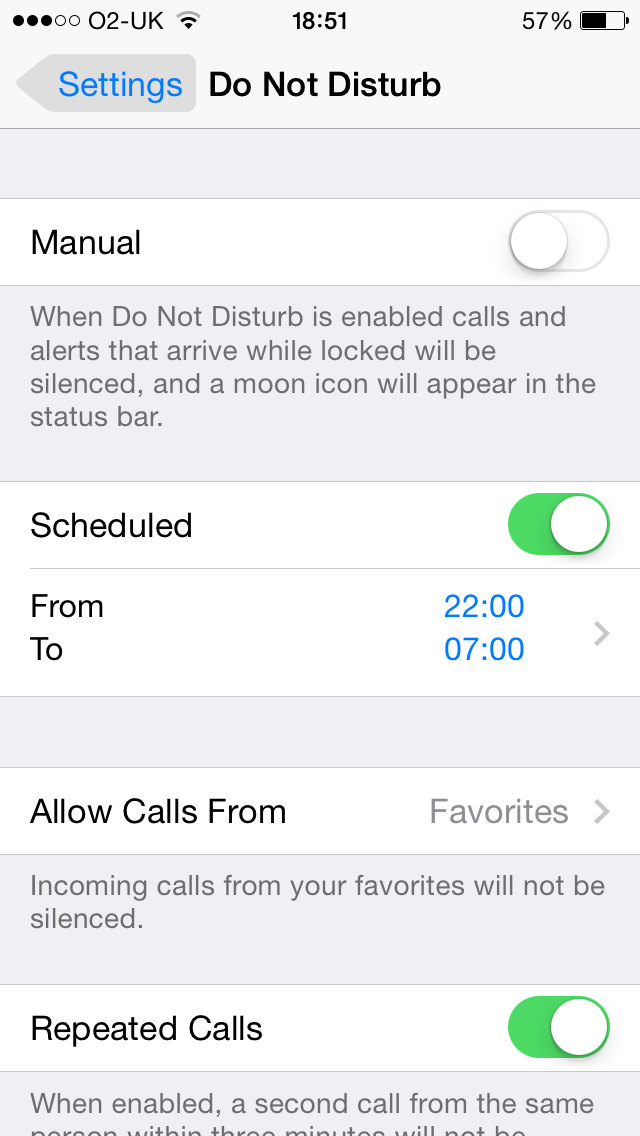
When Apple added the Do Not Disturb feature it meant I could schedule when I would like this turned on and off. I have it set to turn on at 10pm and then off so I can receive calls and text messages from 7am. What would be great, if anyone at Apple is listening, is to have it scheduled for different days so that on the weekend I can have it turn off this feature later.

So there are some caveats to not receiving any calls or messages when the feature is on and you can set that up in the settings. For example, you can set it so that it only works when the screen is locked, that means if you are using the iPhone or iPad it comes through as normal.

You can set it so that your favourites can still contact you or from a particular group that you have created. You can also set it so that if someone from the same number rings you twice within three minutes the call will come through. Good if someone really needs to get hold of you and it is important.

All of this can be found by tapping on Settings on your iOS device and then tapping on Do Not Disturb.

iOS Do Not Disturb 1

You will see that you can turn on and off Do Not Disturb at any time and this can be done by swiping up from the bottom of the screen and tapping on the button that looks like a new moon.
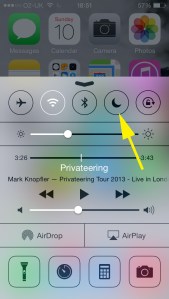
iOS Do Not Disturb

By the way, if you have turned on Do Not Disturb without realising it, and I have seen this done, then you may be wondering why calls are not coming through to you or only some calls.

Posted in iOS, iPad, Iphone | Tagged , , , , | Leave a comment

Organizing Meetings Made Easy Using Doodle.com

Organizing meetings, training sessions or events by email often takes ages or never happens. However, there is something I have been using along with many other people I know. Doodle.com. It is easy to use and you can give people various dates and times and they simply select when they are available.

It is free to use although there is a premium option which allows for calendar integration, sending automatic reminders, missing responses and some other useful features.

Here is a short video tutorial to show you how easy it is to use.

Posted in Management, productivity, Technology, utility | Leave a comment